Showing posts with label Tutorial. Show all posts

Sunday, January 01, 2017

Garmin BaseCamp : Peta Asas & Tempelan Topo

0x0ss-85

Panduan ini untuk mengingati diriku bagaimana untuk create latest map dan gabung peta topo dan diinstall ke perisian Basecamp/Mapsource. Aku tidak mahu terlalu bergantung kepada Malfreemaps, Malsing maps, Navigasi.net dan lain-lain lagi kerana mahukan kelainan.

SOURCE MAP

Screenshot (12h 18m 27s)

1. Layari OpenstreetMap   (semak tarikh update terkini)

2. Download OSM Base Map & Contour Lines (**)

3. Fail OSM ialah gmapsupp_Malaysia.zip dan Curvas_nivel_VFP_Malaysia.exe

4. Install fail Curvas_nivel_VFP_Malaysia

5. Extract gmapsupp_Malaysia.zip(gmapsup.img) ke directory yang sesuai

a. Buka blogku disini dan ikut langkah yang disyorkan.

Clipboard01

6. Source map lain di Free worldwide Garmin map from OpenstreetMap (nampak macam sama tapi tak sama grafiknya)

a. Select Malaysia dalam ruangan Asia atau kalau hendak pilih secara manual Tick Enable manual tile selection dan pilih kotak-kotak yang melibatkan Malaysia

b. Klik Download map now dan satu menu directory fail akan keluar

c. Pilih osm_generic_windows.exe

d. Atau osm_generic_gmapsupp.zip(gmapsup.img) dan ikuti langkah 5a

Clipboard02

LANGKAH MENGINSTALL KE BASECAMP/MAPSOURCE

Screenshot (13h 49m 37s)

7. Download cGPSmapper.exe dan install

8. Download MapsetToolKit.exe v1.77 dan run

9. TOLONG set directory cGPSmapper (rujuk gambar)

10. KLIK Select IMG (Source IMG Files) dari file OSM Base camp/Osm_generic_gmapsupp dari directory( langkah 5/Langkah 6)

11. KLIK Select IMG (Source IMG Files) dari file Topo Asas iaitu (Curvas_nivel_VFP_Malaysia.exe) di C:/Garmin/alternativaslibres/OpenStreetMalaysia (default di install ke directory ini)

12. KLIK Select all (Source IMG Files)

13. KLIK Add –> dari kotak (Selected IMG Files)

14. KLIK Select all (dari kotak Selected IMG Files)

Tutorial mengenai cara menggunakan MapsetToolKits boleh didapati di SINI

15. Di Ruangan Create MAPSET – Routing mode: isikan ruangan Mapset directory (directory dimana nak tempatkan map ini .. sebelum tu create dahulu directory ini)

16. Isi ruangan Mapset name: (apa-apa nama yang sesuai)

17. Family ID (boh la no berapa pun)

18. Product Code : 1

19. Ruangan Option : tick Install in Mapsource

20. KLIK START

21. Tunggu hingga keluar ‘Message Convert completed’


  Terra Incognita

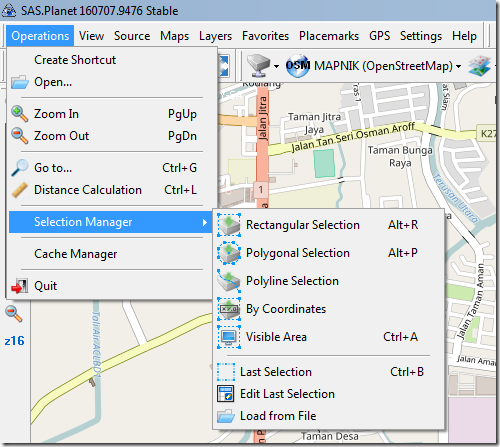
SAS Planet Release 160707

Biar gambar bercerita

image

image

image

image

Click START & Tada ….

Check pic di  Directory Save To:

Monday, August 01, 2016

Garmin Basecamp: Merungkai Kuncian Garmin Map

INGATAN: Panduan ini sebagai rujukanku mengenai tatacara untuk unlock peta  Garmin.

Contoh: fail NepalTopo Routable map.exe

1.  Install Fail

2.  Selesai install , run Basecamp

3.  Satu Popup Screen akan muncul memaklumkan Locked Maps Detected

fail: Nepal TOPO NPL Routable 2011.2

Garmin Nepal Topo 00

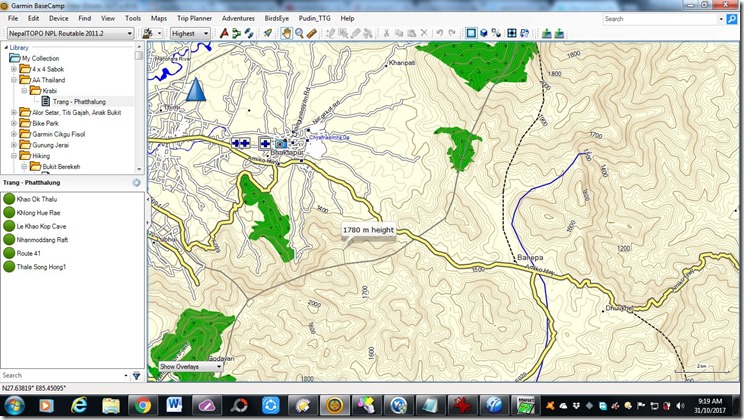
JIKA TIDAK UNLOCK, MAP akan kosong tanpa TOPO seperti di bawah

Garmin Nepal Topo

4. Gunakan perisian Garmin Unlock Generator dan ikut panduan bergambar di bawah

    • Enter your 10 digit Unit ID,
    • select map product <custom mapset>,
    • enter the FID (MapID) of the newest Downloadable Update (the one you want to Unlock).

Garmin Unlock Generator

Unit ID: 3903064165

Masuk unit ID : (dari Device anda ) Main menu –>Setup –> About 

Garmin Unlock Generator 02

Garmin Unlock Generator 03

5. Masukan Map unlock code dalam BASECAMP dan KLIK OK

Garmin Nepal Topo 04

6. TADA … SIAP

Map sudah terlerai kunciannya dan sudah ada TOPO

Garmin Nepal Topo 05


ATAU teknik lainnya dengan menggunakan perisian Protected Garmin File Toolkit (PGFT)

Garmin Nepal Topo 02

Garmin Nepal Topo 03


Rujuk url sini : https://obiwan2208.wordpress.com/2015/03/13/unlock-maps-pc/comment-page-1/

panduan di youtube: https://youtu.be/3lmhlceJUU8

Friday, May 31, 2013

Garmin: Panduan Convert IMG file ke MapSource

INGATAN: Panduan ini untuk memperingati diriku tentang tatacara memasang(install) img fail ke  MapSource.

Perisian : MapSource or BaseCamp      
Map     : Thailand StreetMap 2013.10 NT (English Version)

1. Download file TH-gmapsupp.rar

2. extract the downloaded file to a folder on your hard disk

3. Run the GMapTool.exe


4. Hit "ADD FILES" and add the "gmapsupp.img" file (step 2)

5. Click on "SPLIT" at the top

6. Select the directory where you want to save it

7. Make sure that "CREATE" is set to "files for mapsource"

8. Make sure there is a tick in "compile map preview"

9. Mapset name is "Thailand or whatever"

10. Tick "set mapset FID"

11. FID is 2896 and PID is 1 ……. or (FID:2006)

12. Click on "split all".

13. Wait until it is done, should take a couple of minutes.

14. Close GmapTool.exe

15. Open the directory from step 6.

16. Locate install.bat and run it.

17. Tadaaaa …… That should be all you need to do to install maps into mapsource.

Indonesia GPS map – NavNet V240 NT : 21 April 2013